Wednesday, June 15, 2016

Basics of Programming: Blog Intro && Variables

this is programming, get used to it
Part 2: Functions  |  Part 3: Operators Part 4: Loops

Programming is super scary for a beginner. It's gibberish to those who don't really know what to expect. This is why there are tons of game engines on the market that boast about not needing to know how to code. I felt the same way, and when I see new code now I still get scared.

But it's a mental thing, because programming is actually quite simple. Not easy, necessarily, but simple. There are basic rules to follow that are, more or less, across the board.


Now, let me get this out in the open: I am not a master programmer. I am a hobbyist programmer for games, meaning I do it for fun, not for skill or work. I am entirely self-taught. I don't know a lot of terms, and I will undoubtedly misuse them. As well, there are probably more efficient ways to do what I will show you, but I'm always learning and willing to learn, so if you come across something I did wrong or inefficient, let me know. 

For now I'm going to cover the basics of what things are in programming. There might not be a lot of code this time around as I just want to cover the basics of code construction. I will also try to keep my code writing consistent, but I've bounced around a lot of different languages so it might differ from time to time. Sorry about that. 

The most basic thing to understand in programming is a VARIABLE. A variable is simply a jar. This jar can be labeled or not. It can be full or empty. It can be stacked in crates or it could be a single jar. Whatever is in the jar is information. This information can be a number, a letter, word, a sentence, and can even be another variable. 

To use or make a variable you have to DECLARE it. I had to look this up to make sure I was using the right word. Here is a basic declaration of a variable:

var jar; 

That's it. This is a declared variable. As of now it is an empty jar. It has no label or information filling it yet but it has been declared. Declaration means it can now be used. So let's use it:

jar = "honey"; 

Now our variable jar is full of the information "honey". The information "honey" is text, which is called a STRING.  

You'll notice I didn't put var before jar this time around. The reason for this is simple: jar has already been declared. A variable only needs to be declared once for it to be used, so we don't want to declare it again. In fact, most compilers will catch this but it's good to know in case you get the error.

You might be wondering why we don't just say "honey". There are a few reasons, but one important reason is that, generally speaking, we want to be able to change the value of a variable at any time. Another would be the contents of a variable might be really long and messy and hard to type a thousand times, where jar is three letters. And probably the most important reason is because that’s how it’s done technically.

Let's say we wanted to change the contents of our jar. We could do something like this: 

jar = "tomato";  

So far we've changed jar to mean "honey" and "tomato". But we could also change it to a number if we wanted: 

jar = 42; 

We can do this because we're using a WEAK TYPED language. Some programming languages don't allow this conversion. These intolerant and exclusive languages rely on STRONG TYPED programming. Here is an example of a strong typed variable: 

string jar = "pooh"; 

Notice I wrote string instead of var. I don't have to say var as a string is a type of variable already. This means that our variable jar has to be a string. I could not do the following: 

string jar = 42;

42 is not a string, but an integer. A strong typed variable cannot be anything other than what its type says it is. If someone asks you for your age, you cannot say “nachos” (no matter how delicious) because “nachos” is not a number. The only answer that fits the question is a number, so no other type will be accepted.

Strong typed programming is what I'm used to using, and I think it's the better way to go, because my philosophy of programming is that everything should be intentional (which is probably why I'm not a big fan of procedurally generated games like FTL, The Pit, or Binding of Isaac; topic for another time). Strong typed programming is not a must and is not the best way to do things, just the way I prefer to do it. As well, weak typed variables have their place too, but that’s a little more advanced topic.

Here are the main types of variables (Data Types): 

Boolean – true or false, 1 or 0. Depending on the language it can either be called a boolean or simply bool 

Integer – just like in Maths class, an integer is a whole number, negatives, 0, and positives. I've only ever seen it as int 

Floating Point Number – all numbers, whether an integer or a decimal. There are many different variations, most of which I don't even know the point of. It could be number, float, double, and some others, though number and float are the main ones I've used and seen 

String – like we talked about and used, this is text. I've only ever seen it as string. Strings also use either double-quotes (“”) or single-quotes (‘’). It doesn’t matter which as long as they are grouped together. You cannot use do this “love’.

Character – similar to a string, but it's just one character (shocker!). I've only seen it as char 

Variables are the basic building blocks of programming (probably not an accurate statement; don't listen to me). Variables are used everywhere and if you understand that variables are just a jar that can be filled and moved from shelf to shelf, then you'll get the rest of programming. Eventually.

I hope you enjoyed this brief intro to programming variables. Up next I'm going to just jump right into functions. I think most people would go to operators first, but I'm a rebel and I'll never be any good. 

To be continued...

Part 2: Functions  |  Part 3: Operators | Part 4: Loops

Monday, May 2, 2016

The Witcher 3 - Hover Horse


Decided to post a video about one of the greatest games and greatest gaming glitches ever made in the Witcher 3 Wild Hunt.

Also, I'm back!

For now.

Thursday, January 22, 2015

Main.as or Document Class (AS3) Part 2

As promised we're going to go over keyboard inputs now.

The point behind the Document Class (DC) is to basically control everything that goes on in your game/program/whatever.  Unless you have a mouse-only game you will always need the keyboard.  As the keyboard is static in the sense that it's always the same you can go ahead and use the same setup for every program.  The work is long and boring initially, but you only have to do it once, so it's worth it.

1.  Set up your variables.

public var kLeft:Boolean;//37
public var kRight:Boolean;//39
public var kUp:Boolean;//38
public var kDown:Boolean;//40

I'm only doing these for as an example.  You can add all the keys if you wish.  We set these Booleans up because we only care if a key is pressed down or not.  We don't care what the functionality is.  That can be handled in the other Classes, not our Main.as.

2.  Call the keyboardEvent listeners.

 stage.addEventListener(KeyboardEvent.KEY_DOWN, keysDown, false, 0, true);
 stage.addEventListener(KeyboardEvent.KEY_UP, keysUp, false, 0, true);

This calls to see if a key is pressed down or is released up.  Make sure you add that "stage." beforehand as it won't work otherwise.

3.  Handle key presses.

 public function keysDown(ke:KeyboardEvent) : void
 {
  if(ke.keyCode == 37)
  {
   kLeft = true;
  }
 
  if(ke.keyCode == 39)
  {
   kRight = true;
  }
  
  if(ke.keyCode == 38)
  {
   kUp = true;
  }
  
  if(ke.keyCode == 40)
  {
   kDown = true;
  }
 }
 
 public function keysUp(ke:KeyboardEvent) : void
 {
  if(ke.keyCode == 37)
  {
   kLeft = false;
  }
  
  if(ke.keyCode == 39)
  {
   kRight = false;
  }
  
  if(ke.keyCode == 38)
  {
   kUp = false;
  }
  
  if(ke.keyCode == 40)
  {
   kDown = false;
  }
 }

What is this sorcery?!  Well it's quite simple, actually.  From the previous step we call constantly to see if a key is pressed or released.  When it's pressed we check the keyboard input (ke) and check it against whichever key want want to process (keycode == "n").  Don't know the keycode number?  No problem.  You can check the Interwebs with a Google search or just go here:  http://www.dakmm.com/?p=272.  Don't worry, I'm not affiliated with them.  I just have that bookmarked.  You can also do the arduous task of finding the keycodes yourself by simply tracing out the keycode in the keysDown to look something like this:

 public function keysDown(ke:KeyboardEvent) : void
 {
  trace(ke.keyCode);
 }

Now, when you run the program you can just press a key and it should trace out what keycode it corresponds to.

So in the keysDown function we set the corresponding Boolean to true, so if we press the down arrow then kDown is true.  And in the keysUp function we do the reverse, so if we release the down arrow, kDown is false.

Now because we already setup the whole Main.instance thingy from the last part we can access the key presses from anywhere.

3.  As an example, let's say we created a Hero.as Class which of course allows us to use a Hero.  We could create an update function that constantly checks to see which keys are being pressed.  Here's the whole sheband:

package  
{
/*
 An Amazing Coding Product of Benjamin Floyd
 
 If you got this, even by trickery, feel free to use it.
 
 A tip-o-the-hat would be nice though.
*/

import flash.events.Event;
import flash.display.MovieClip;

public class Hero extends MovieClip
{
 public function Hero() 
 {
  addEventListener(Event.ADDED_TO_STAGE, init, false, 0, true);
 }

 public function init(e:Event = null) : void
 {
  removeEventListener(Event.ADDED_TO_STAGE, init);

  addEventListener(Event.ENTER_FRAME, update, false, 0, true);
 }
 
 public function update(e:Event = null) : void
 {
  if(Main.instance.kLeft)
  {
   x -= 1;
  }
  else if(Main.instance.kRight)
  {
   x += 1;
  }
  
  if(Main.instance.kUp)
   {
   y -= 1;
  }
  else if(Main.instance.kDown)
  {
   y += 1;
  }
 }
}
}

If you run it as is, then you can move your little Hero all along the place.

And that's it.  All you had to do was see if a key was  pressed and you could add any functionality you wanted to go along with it.

4.  Of course writing out Main.instance every single time you want to access the DC is stupid and annoying so you can simply add a variable to replace all that typing like so:

 public var ROOT:Object;

Now, we need to make sure the ROOT is initialized so in our init function place the following:
   
 ROOT = Main.instance;

Now anywhere you have "Main.instance." just replace it with "ROOT." and you can easily access your DC.

That's pretty awesome, right?

Well, thanks for reading.  I hope you learned something from it.  Join me next time when I talk about some other stuff in regards to programming in ActionScript 3.0!

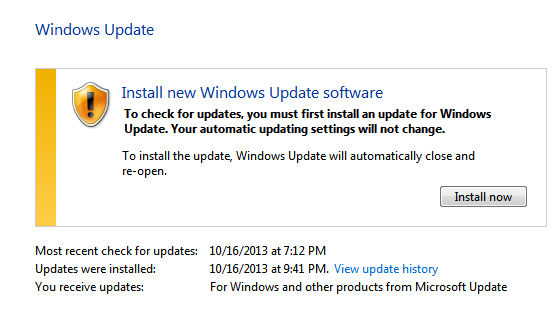
You have to update before you update.  Thanks, Windows.
Here's a screenshot I took last night.  Steam has been crashing my computer when it tries to load so I looked up why.  It said to make sure Windows is up to date.  So I went to update and realized I hadn't updated since the last time I was using this blog, about 1.5 years ago (in case you're wondering I don't update because my computer will almost always crash after an update; I have real good luck that way).  Anyway, I thought this was funny and wanted to share.

Wednesday, January 21, 2015

Main.as or Document Class (AS3) Part 1

Something that I've found to be vitally important in writing ActionScript 3 is accessing the Document Class from other classes and packages.  And the beauty is that once you make your Main.as you will need only a bit of time to adapt it for your other projects.

Keep in mind that my Main.as is constantly changing, mostly because I keep thinking of stuff to add that I know I'll always need.

Here's a bit of code to start us off:

public class Main extends Sprite 
{
 public static var instance:Object;
 public function Main() 
 {
  addEventListener(Event.ADDED_TO_STAGE, init, false, 0, true);
 }
 public function init(e:Event = null) : void
 {
  removeEventListener(Event.ADDED_TO_STAGE, init);
   
  instance = this;
 }
}

So what does this mean and do?

My understanding is that this is called a Simpleton (after re-reading I realized it's Singleton, but I left that in because it's funny). But whether or not that's correct, what this does is allows us access to the Main.as at all times from anywhere in the program.  Of course with what we have written so far, this doesn't mean much, so let's add some important info that would need to be accessed in most, if not all, Classes:


 public const SW:int = 512;
 public const SH:int = 288;
  
 public const SWH:int = SW / 2;
 public const SHH:int = SH / 2;
  
 public var TS:int = 16;
 public var TSH:Number = TS / 2;


In this section we have the stage width (SW) stage height (SH) and half of both of those (SWH/SHH). These are the dimensions of the screen and it makes it a lot easier to access than typing in:

        stage.stageWidth

We also have in there the tile size (TS) and half of the tile size (TSH). Because TS is set to 16 and our stage dimensions are 512 x 288 we have a 16:9 screen ratio to work in.

Do you understand yet why this Main.as is important?  Here's an example:

I have a plumber who has to check collisions with the environment.  In order to do so I need to find out if he's going to collide with a Block or if he's just falling through air.  In order to find out if he's hitting said Block I need to know where the nearest Block is.  Since the map has already been laid out (in this example it has, we'll get to that for real later) we know that all tiles are lined up by the TS that we have established in our Main.as.  So from the plumber's Class we can access Main.instance.TS to find out if the plumber bashes his head on a Block or just goes through air.

If this makes sense to you, you might be wondering why you don't just put in "16" instead of calling out to Main.as.  If it's a simple program, you're right, there's probably not much reason to do this.  But let's say you wanted one level where everything was giant except the plumber.  You could then easily change Main.TS to 64.  You wouldn't have to go back in to the plumber Class or the enemy Class or whatever other class needs to know the tile size to change it all.  You have to type in one number on one Class to change the way the plumber will interact with the level.  That's pretty cool, right?

Well, that's it for now.  I hope you enjoyed this little insight into what I'm learning and doing.  Next time I'll talk some more about the Document Class and how setting up the keyboard controls in Main.as makes life much easier down the road.

Here's a picture to go along with all these boring words:

http://www.gigs4gags.com/funny-programming/

Tuesday, January 20, 2015

Necro Blog

Hmm.  It's been a long time friend of mine.  If we were to go by the numbers according to years it's been 2 years since I last did anything website/blog related.  In actual time it's been 1 year and 4 months.  It's not too late to revive this blog.  As long as I'm alive, it's never too late.

Lately, I've been creating a Tile-Based 2D Engine in Flash, or more accurately with ActionScript 3.0.  I've created multiple variations because I just don't know what to do.  I'm getting better, my code is getting smaller, and I'm learning the value of Object Oriented Programming (OOP).

I started writing a tutorial and only wrote it as I programmed it, because I know most tutorials have so many errors that it never compiles.  But I got too carried away and stopped writing the tutorial and only wrote code.

I started to implement the engine into an actual game, but my focus kept shifting.  Did I want to do a Mario-like platformer or a Zelda-like top-ish down game?  Both, I found.  And the code is similar up to a certain point.  When it got to that certain point I realized that if I knew how to make things OOP then I wouldn't have to write all this code again.  So I went back and refactored the crap out of everything.

So I'm at a crossroads of sorts.  I got my engine up and running for a Zelda-like to the point that I have tile-based collisions with the map and some other Maths based collisions with everything else.  It's incredibly awesome.  I feel incredibly awesome for having written it without the need for a tutorial to look up (I've written it so many damn times I should know it by heart).  But where do I go from here?

I thought about writing a full tutorial of what I've done.  But my goal is not necessarily to be a teacher, but to make games.  So, while writing this blog, I've decided to finish a game.  I don't know when it'll be done.  I don't know if it will be good.  But I know that I will finish it.  It's not a New Year's Resolution or some such as I don't know anyone who has ever kept one.  This is a promise to myself and a promise to my wife who has been very tolerant of my lax attitude about pursing my dream.  This game will be finished by the end of April if not sooner.  I have a plan for it.

The first step is to basically turn this into a devblog.  I'll be sharing what I think is awesome as well as just providing some insights that I've gleaned in my foray into programming.

Peace out and here's hoping to a productive gaming year!


Just because pictures are awesome and I mentioned Mario earlier on, here's a really cool picture.  I don't know the source (and I saved it so long ago I don't remember where I got it) so if anyone knows the creator send me a line so I can give proper credit.

Friday, September 27, 2013

New New Website!


Two posts in one day after a five month dry spell?  Hold me back!

Yes I have just completed my newest new rendition of my website.  It's much more friendly in that it is not a Flash website (except the Flash games, because they're Flash games).

Hop on over and check it out.  And thanks for playing.  www.FLOYDIAN THEORY.com

Welcome Back, Me!


Wow, it's been a long time since I've posted. But I'm a married man now and will probably have even less time to post than normal. But real quick I'm going to talk a little bit about a game I haven't played in a long time. It's called Commander Keen and it is amazing.


I used to play these games all the time when I was back in middle school, maybe even when I was in grade school.  It's hard to remember anything nowadays.

Command Keen is a tile based platformer which luckily allows you to save your progress (remember, I'm married now, so I have very little free time, thus saves make gaming easy).  I'm not sure if I love this game because I'm in a nostalgic high or if this is actually just a fun game.  I think it's fun.  I mean, in how many other games does the hero travel around on a pogo stick?

None.

Well, I'm sure there are more, but that's not the point.  Pogo sticks are cool!

So I just finished beating the first episode.  While playing it I started to remember the game bit by bit.  The wolf creature was always frightening when I was younger because it jumped at seemingly random heights.  So even if you were on a high ledge it could still jump and get you.  This time around, umpteen years older, I saw the beast and immediately ran away, as memories flooded back into my mind.  Then I remembered that young Billy (Commander Keen) has a raygun.  I turned and zapped.  Four times.  Wolf monster no more!

The first episode is short, providing a good couple hours if you try and get everything and are slow on the uptake like yours truly.  It's a great bit of platforming history as well as a solid game in general which holds up in play if not in looks after all these years.  I wouldn't say it's as hard as Super Mario Bros. on the NES but that might just be because there are saves in Commander Keen which makes life a lot easier.

If you like solid platforming then pick it up on Steam.  It's five bucks for the lot and if it goes on sale there's no reason not to pick it up.

Also, this game was made by ID Software.  You know, the guys who made DOOM and Rage and everything.